- Platform
- LogicMachine
- Installation
- App from .ipk package
- Bus
- KNX through group addresses
- Calendars
- .ics feeds from Google Calendar, Apple iCloud, Outlook / Microsoft 365 or compatible services
- Calendar access
- .ics link reachable over HTTPS without interactive authentication
- Check frequency
- Every 60 seconds
- Precision
- Within about 1 minute
- Units per controller
- More than one
- Interface languages
- Italian, English
- License
- Perpetual, one per LogicMachine
- Network
- HTTPS Internet access from the controller
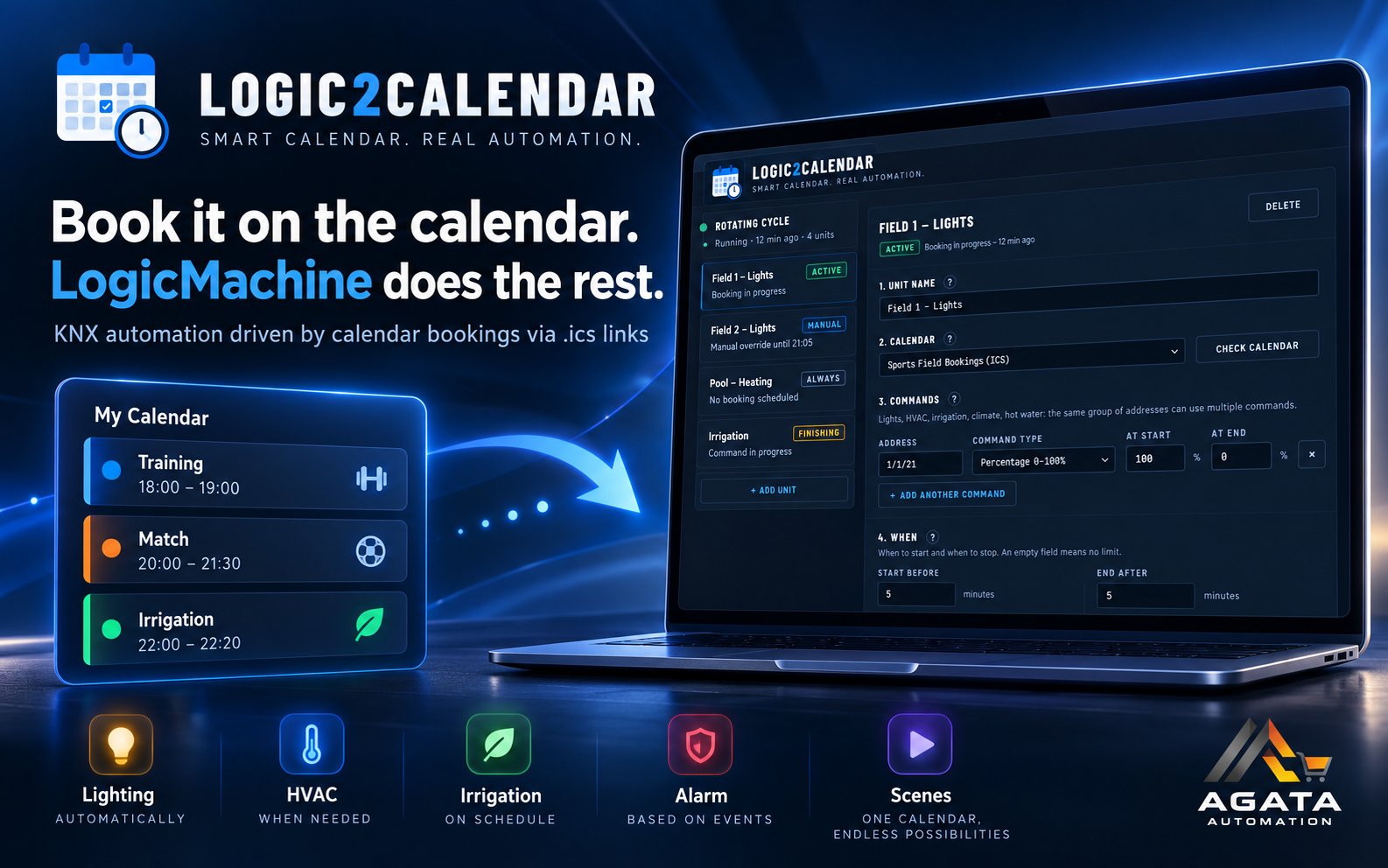
Book it on the calendar. LogicMachine does the rest.
Logic2Calendar is an app for LogicMachine that reads a standard online calendar and automatically controls the KNX loads associated with bookings. The facility manager does not need to touch the controller for every change: simply create, edit or delete events in the calendar already in use.
- CalendarGoogle Calendar, Apple iCloud, Outlook / Microsoft 365 or another
.icsfeed - Logic2Calendarevery minute it decides what the load should be
- KNXlights, HVAC, irrigation, alarms, scenes
For example, if a sports field is booked from 7:00 PM to 8:00 PM, Logic2Calendar can:
- switch the lights on a few minutes before;
- switch them off a few minutes after;
- take sunrise and sunset into account;
- apply safety limits independent of the calendar;
- respect a manual intervention on the installation.
See how it works
Not only lights
Logic2Calendar can control any group address managed by the installation: lighting, alarms, irrigation, heating and cooling, boilers, ventilation, signs, controlled sockets, EV chargers, blinds, KNX scenes, dimmers, thermostat modes and numeric values.
| Command type | Example |
|---|---|
| On / Off | lights, pumps, alarms, boilers |
| Percentage 0–100% | dimmers, blind position |
| KNX scene | match, conference, opening |
| Thermostat mode | comfort, economy, standby, protection |
| Decimal number | temperature set-point |
| Integer 0–255 | numeric values required by the installation |
| Value based on the event title | “Match” = 100%, “Training” = 60% |
Reliable even when things change
State-based, not event-based
It does not schedule an ON and an OFF in advance: every minute it checks the situation again and decides what the load should be. So it reacts to a booking deleted while in progress and realigns after a controller restart.
Two safety rules independent of the calendar
Maximum run time, so a load does not stay active beyond the configured limit; curfew, to prevent activation during configured time ranges even if a booking exists.
Manual intervention takes priority
If someone switches a load off during a booking, Logic2Calendar does not switch it back on until that booking ends. If someone switches it on outside booking hours, the app does not force it off just because no booking is present.
Complete power outage. If power is also lost to the controlled load during a booking, when power returns the app may interpret the OFF state as a manual intervention and respect it until the end of that booking. This is intentional, and follows from the priority given to manual commands.
The calendar: what you need
Logic2Calendar reads the calendar directly from LogicMachine. The .ics link must therefore be reachable by the controller over HTTPS without login, cookies, web pages or manual confirmation.
- Google Calendar: the secret address in iCal format. The calendar does not need to be public on the Web: the secret link acts as a key.
- Apple iCloud: enable Public Calendar and use the resulting link.
- Outlook / Microsoft 365: the calendar’s published ICS link.
- Other calendars: supported if they expose an
.icslink LogicMachine can read without interactive authentication.
Treat the .ics link as confidential: anyone who has it can read the events published in that calendar.
Main features
- Google Calendar, Apple iCloud, Outlook / Microsoft 365 and other
.icsfeeds - Daily, weekly, monthly and yearly recurrences
- Cancellation and exception handling
- State check every 60 seconds, precision within about 1 minute
- Maximum run time and curfew
- Manual-intervention priority
- Sunrise and sunset
- Start and end margins around the booking up to 240 minutes
- Multiple units, each with its own calendar, load and rules
- Multiple addresses driven by the same unit
- Different values based on the event title
- End-of-booking warning
- Booking title on a compatible display
- “Check the calendar” button and diagnostic report
- Italian and English interface
- Installation from an
.ipkpackage
How to buy and activate it
- Download the app, free, and install it on LogicMachine from App Store → Install from file.
- Buy the license on AgataStore.
- You receive an e-mail with a link to request it: there you paste the controller fingerprint, which you find on the app page with the Copy button.
- The license arrives by e-mail once the payment is confirmed, usually within a few minutes.
- Paste it into the app page and save.
The license is perpetual and valid for one LogicMachine. Without a license the app installs, but controls no loads and shows no units to configure: it is not a trial version. If you replace the controller, a new license is needed. If you lose your license, write to us and we will send it again.
Requirements
- A LogicMachine that allows installing apps from
.ipkfiles - HTTPS Internet access from the controller
- An
.icsfeed LogicMachine can read without interactive login - The KNX group address of the load to control
- For the first setup, a computer or smartphone on the same network as the controller
What you receive
- The app’s
.ipkpackage, always the latest version - The user guide in English and Italian
- The perpetual license for one LogicMachine, by e-mail
Documentation
Frequently asked questions
Does the calendar have to be public?
Not in the sense of “visible to everyone on the Web”. It must however expose an .ics feed LogicMachine can read directly, without interactive authentication. Google Calendar uses the secret iCal address; iCloud requires Public Calendar; Outlook / Microsoft 365 uses the published ICS link.
Is a subscription required?
No. The license is perpetual, and the app reads the calendar you already use through its .ics feed.
What happens if the Internet connection drops?
Logic2Calendar keeps the last decision it made, subject to the configured safety rules. When the calendar becomes readable again, it resumes evaluating it.
Can I use it for gates or locks?
For convenience functions yes, but not as the only access-control system: it works with minute-level precision and depends on reading the calendar over the Internet.
Can I move the license to another controller?
No. The license is tied to the LogicMachine fingerprint: if the controller is replaced, a new license is needed.
L2C-LIC-1Logic2Calendar — KNX function driven by google calendar, app for LogicMachine
Related Products


